ComfyUI+Flux.1构建超强生图功能
Comfy 是强大的开源基于节点的生成式人工智能应用程序。ComfyUI开发的是让用户自主解决AI应用难题的软件,通过提供模块化构建工具集,使用户无需编写代码即可创建定制化解决方案。正因如此,ComfyUI已应用于视频制作、3D资产生成、图像处理、音乐创作、艺术装置设计、API服务支持等多元场景,持续拓展创意表达的边界。
下载安装
- 访问Comfy官方网站

- 根据自己的操作系统进行下载安装即可
基本使用
- 打开ComfyUI后,会自动弹出工作流模版,可直接按需要打开需要的工作流即可使用
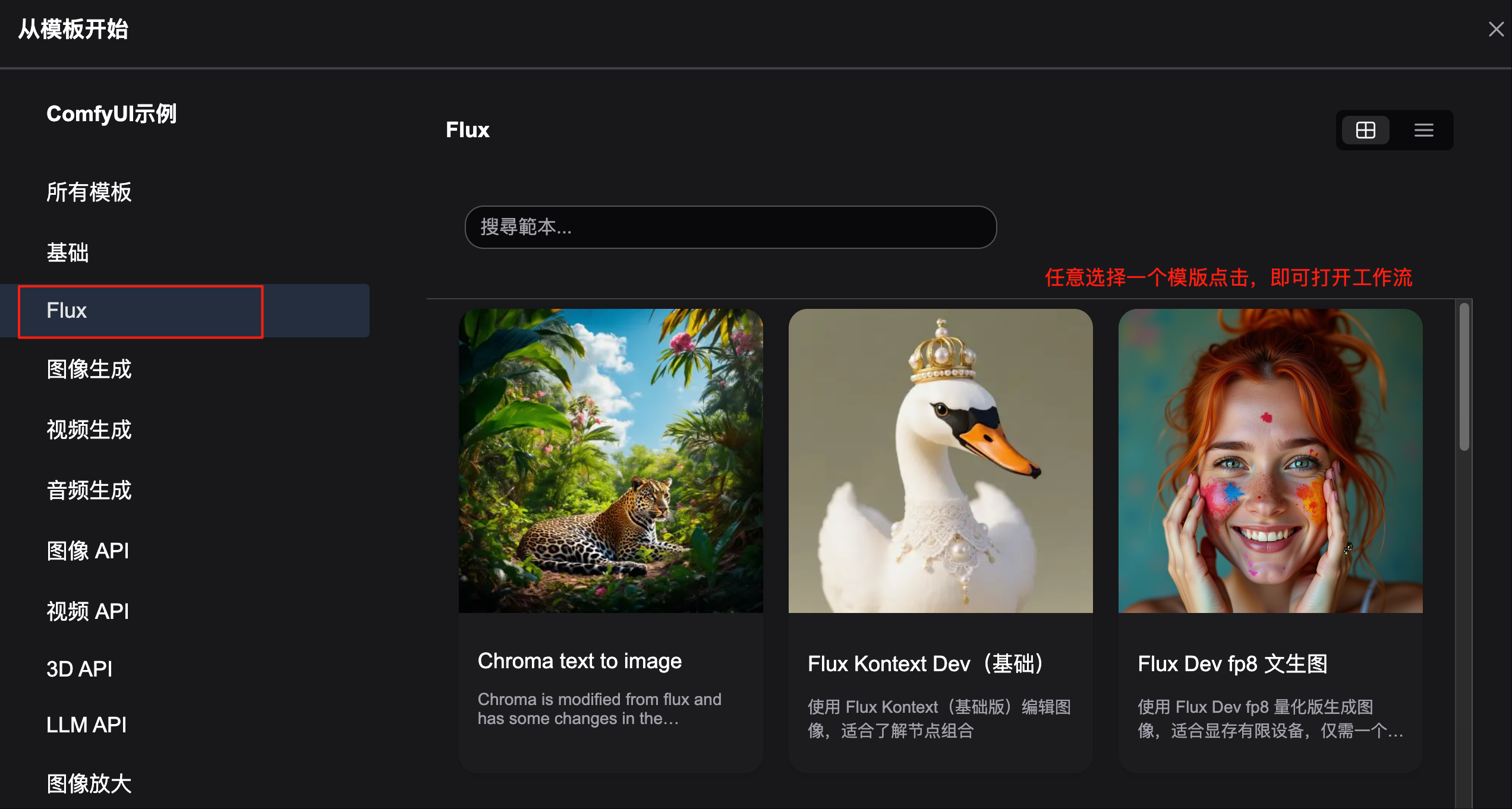
- 打开工作流后,如果缺失模型会提示你自动安装,但需要保证科学上网且网速佳,否则很慢
网络不好的参考相关模型下载直接下载各个模型即可
Flux dev/Schnell 文生图

- 面向safetensors模型文件的工作流:flux_dev_checkpoint.json
- 面向gguf模型文件的工作流:flux_dev_gguf.json
Flux Kontext 图生图
- 是市场最强的AI图片编辑模型,主打“上下文感知的图像生成与编辑”,可生成风格转换、角色转换、背景替换、文本编辑等效果。
- 模型同时输入文本与图像上下文,支持本地和全局的多轮编辑,同时保持对象和人物一致性。
- 在单轮质量与多轮一致性方面具有明显优势,是图生图领域最强大的模型之一。
Flux Kontext 提示词技巧
尽量使用英文
1. 基础修改
- 简单直接:
"Change the car color to red" - 保持风格:
"Change to daytime while maintaining the same style of the painting"
2. 风格转换
原则:
- 明确命名风格:
"Transform to Bauhaus art style" - 描述特征:
"Transform to oil painting with visible brushstrokes, thick paint texture" - 保留构图:
"Change to Bauhaus style while maintaining the original composition"
3. 角色一致性
框架:
- 具体描述:
"The woman with short black hair"而非"她" - 保留特征:
"while maintaining the same facial features, hairstyle, and expression" - 分步修改:先改背景,再改动作
4. 文本编辑
- 使用引号:
"Replace 'joy' with 'BFL'" - 保持格式:
"Replace text while maintaining the same font style"
常见问题解决
角色变化过大
❌ 错误:"Transform the person into a Viking"
✅ 正确:"Change the clothes to be a viking warrior while preserving facial features"
构图位置改变
❌ 错误:"Put him on a beach"
✅ 正确:"Change the background to a beach while keeping the person in the exact same position, scale, and pose"
风格应用不准确
❌ 错误:"Make it a sketch"
✅ 正确:"Convert to pencil sketch with natural graphite lines, cross-hatching, and visible paper texture"
核心原则
- 具体明确 - 使用精确描述,避免模糊词汇
- 分步编辑 - 复杂修改分为多个简单步骤
- 明确保留 - 说明哪些要保持不变
- 动词选择 - 用”更改”、”替换”而非”转换”
最佳实践模板
对象修改:"Change [object] to [new state], keep [content to preserve] unchanged"
风格转换:"Transform to [specific style], while maintaining [composition/character/other] unchanged"
背景替换:"Change the background to [new background], keep the subject in the exact same position and pose"
文本编辑:"Replace '[original text]' with '[new text]', maintain the same font style"
切换近景"Show me a close up of the girl's face"
记住: 越具体越好,Kontext 擅长理解详细指令并保持一致性。
相关模型下载
可根据需要点击下载链接进行下载。
1 | 📂 ComfyUI/ |
下载Flux Dev模型:
- 原模型:flux1-dev.safetensors
放置在 ComfyUI/models/checkpoints/ 文件夹下 - 量化版模型:FLUX.1-dev-gguf
放置在 ComfyUI/models/diffusion_models/ 文件夹下
下载Flux schnell模型:
- 原模型:flux1-schnell.safetensors
放置在 ComfyUI/models/checkpoints/ 文件夹下 - 量化版模型:FLUX.1-schnell-gguf
放置在 ComfyUI/models/diffusion_models/ 文件夹下
下载Flux Kontext 基础模型:
下载后放置在 ComfyUI/models/diffusion_models/ 文件夹下
BF16 原模型(safetensors格式)
- 镜像站下载flux1-kontext-dev.safetensors (需要注册登陆HuggingFace后才能下载)
- 网盘下载 flux1-kontext-dev.safetensors(访问密码: 6990)
需要显存24G以上,比如英伟达RTX 4090、RTX 6000 Ada、A6000、H100
BF16 原模型(gguf格式)
- 镜像站下载flux1-kontext-dev-BF16.gguf
- 网盘下载 flux1-kontext-dev-BF16.gguf(访问密码: 6990)
需要显存24G以上,比如英伟达RTX 4090、RTX 6000 Ada、A6000、H100
FP8 模型
- 镜像站下载flux1-dev-kontext_fp8_scaled.safetensors
- 网盘下载flux_dev_fp8_scaled_diffusion_model.safetensors(访问密码: 6990)
需要显存16G以上,比如英伟达RTX 4090/A5000
INT8 模型
- 镜像站下载flux1-kontext-dev-Q8_0.gguf
- 网盘下载flux1-kontext-dev-Q8_0.gguf(访问密码: 6990)
需要显存16G以上,比如英伟达RTX 4090/A5000
Q6_K 模型
- 镜像站下载flux1-kontext-dev-Q6_K.gguf
- 网盘下载flux1-kontext-dev-Q6_K.gguf(访问密码: 6990)
需要显存12G以上,比如英伟达RTX 3090/4080
Q4_K_M 模型
- 镜像站下载flux1-kontext-dev-Q4_K_M.gguf
- 网盘下载flux1-kontext-dev-Q4_K_M.gguf(访问密码: 6990)
需要显存8G以上,比如英伟达RTX 3060/3070/3080
下载Flux Text_encoder模型:
下载后放置在 ComfyUI/models/text_encoders/ 文件夹下
镜像站下载clip_l.safetensors
网盘下载clip_l.safetensors访问密码: 6990)镜像站下载t5xxl_fp8_e4m3fn_scaled.safetensors
网盘下载t5xxl_fp8_e4m3fn.safetensors(访问密码: 6990)
下载Flux Vae 模型:
下载后放置在 ComfyUI/models/vae/ 文件夹下
- 镜像站下载ae.safetensors
网盘下载 ae.safetensors (访问密码: 6990)
 wechat
 alipay